

Visual Reference
This page is the visual companion for the operating corpus. Use it when you need to orient yourself quickly across the company graph, the work graph, the skill system, and the docs site itself.Quick Index
| Layer | Visual | Best For | Source Material |
|---|---|---|---|
| Organizational topology | Open SVG | Seeing the company divisions and ownership model | Tremor Company Appendix, Org Chart |
| Team / agent hierarchy | Open SVG | Reading the reporting tree and role roster | Tremor Teams Appendix, Tremor Agents Appendix, Expanded Skills Matrix |
| Project-task-routine hierarchy | Open SVG | Mapping goals, projects, issues, and routines | Projects, Tasks |
| Skill system structure | Open SVG | Reading the skill stack from shared base layer to local Tremor skills | Skills README, Company Ops, Strategy |
| Docs-site information architecture | Open SVG | Finding the right docs section and understanding how operating docs sit beside the main site | Docs Site Review, Docs Style Guide |
How To Read This Page
The diagrams are arranged from the widest system boundary to the most navigable surface:- company topology
- reporting and role hierarchy
- work hierarchy
- capability hierarchy
- docs-site navigation
Organizational Topology
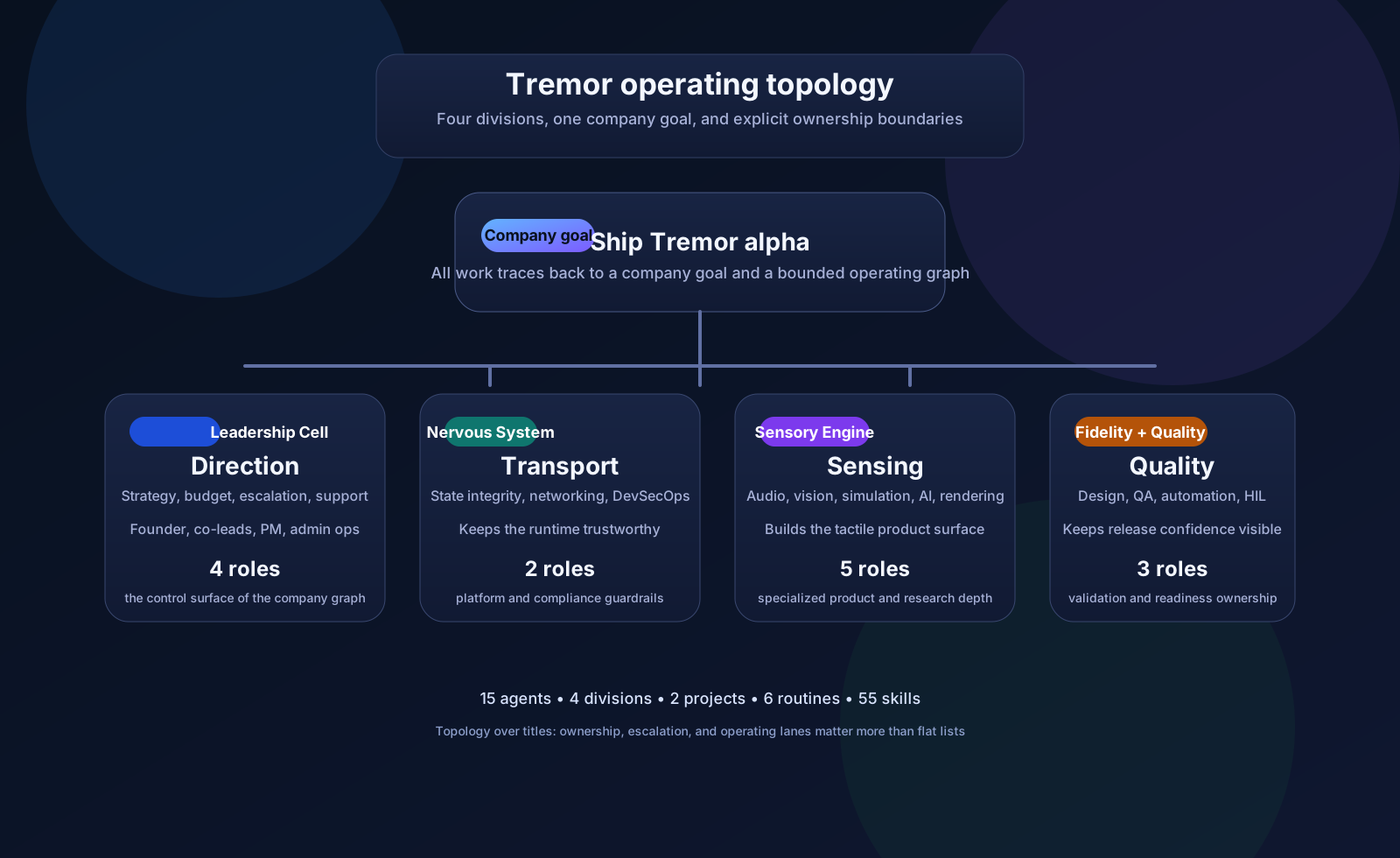 Tremor is organized as a four-division operating graph: Leadership Cell, Nervous System Division, Sensory Engine Division, and Fidelity and Quality Division. The topology emphasizes ownership boundaries, not just titles.
Primary source anchors:
Tremor is organized as a four-division operating graph: Leadership Cell, Nervous System Division, Sensory Engine Division, and Fidelity and Quality Division. The topology emphasizes ownership boundaries, not just titles.
Primary source anchors:
Team And Agent Hierarchy
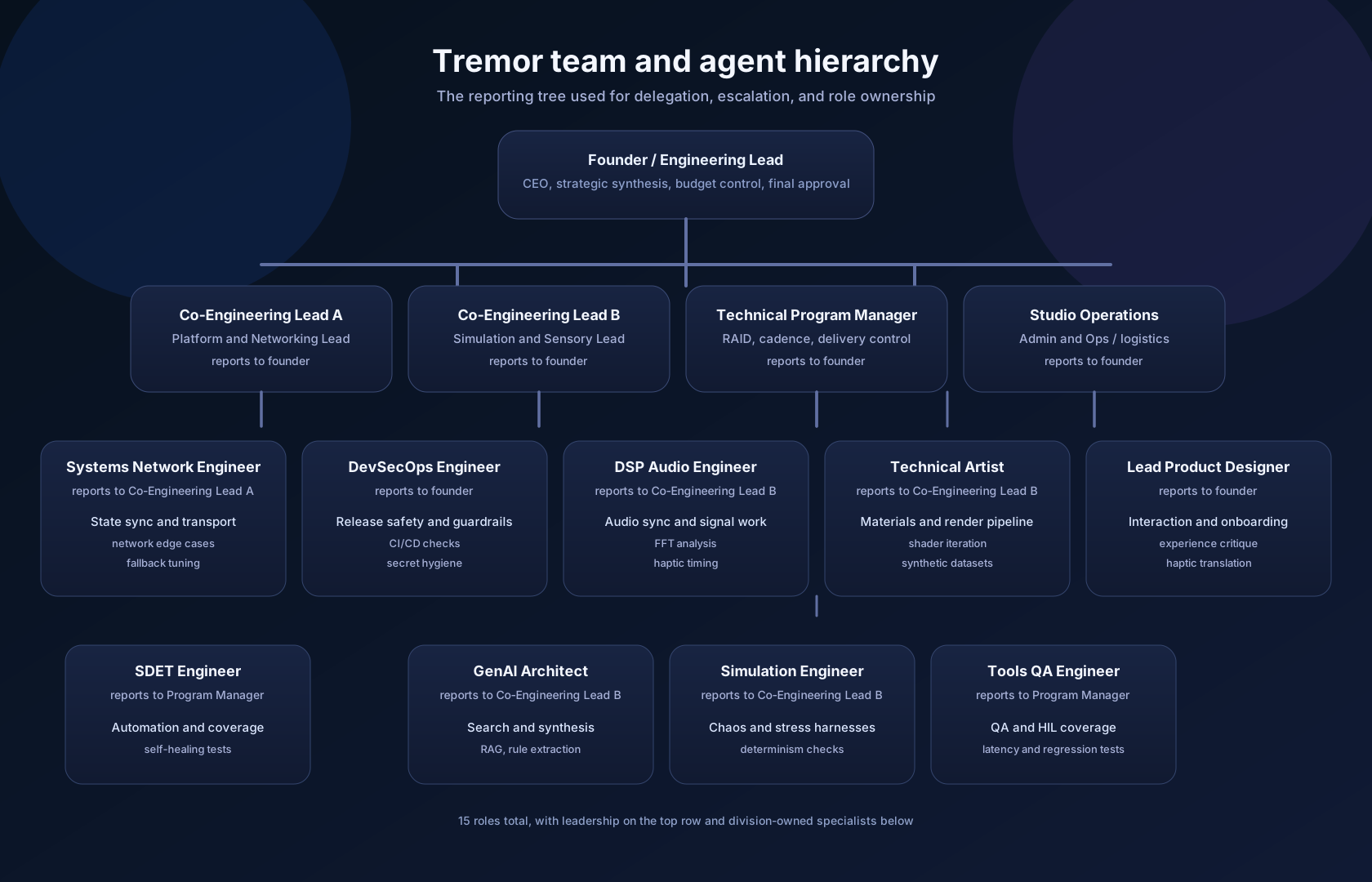 This view shows the reporting chain the source corpus uses for delegation, escalation, and role-specific ownership. It is the fastest way to see which roles sit in the leadership cell and which roles are division-owned.
Primary source anchors:
This view shows the reporting chain the source corpus uses for delegation, escalation, and role-specific ownership. It is the fastest way to see which roles sit in the leadership cell and which roles are division-owned.
Primary source anchors:
Project, Task, And Routine Hierarchy
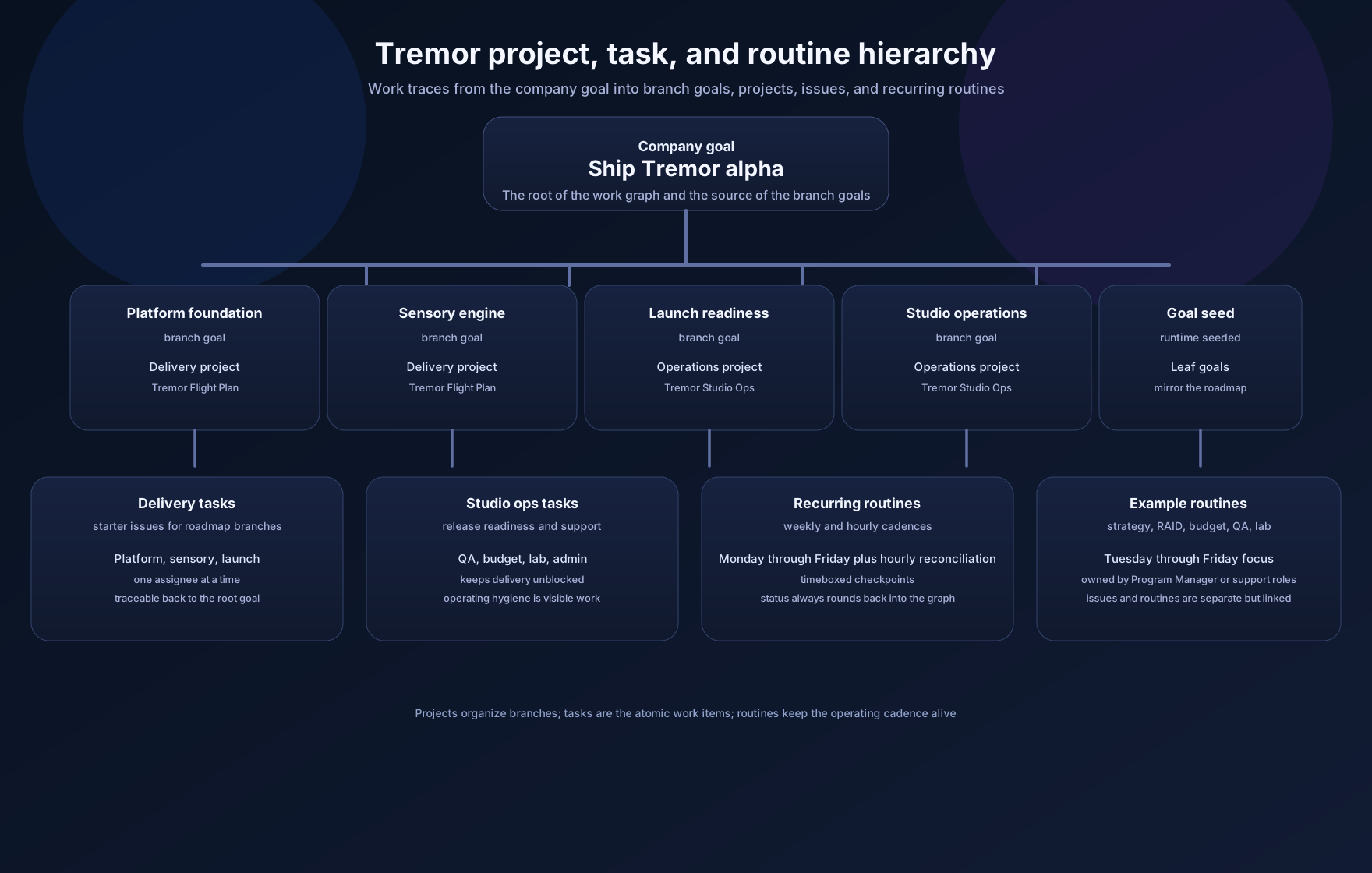 Use this view when you need to trace work from the company goal into projects, starter tasks, and recurring routines. The delivery project carries the roadmap branches; the studio operations project carries cadence and hygiene work.
Primary source anchors:
Use this view when you need to trace work from the company goal into projects, starter tasks, and recurring routines. The delivery project carries the roadmap branches; the studio operations project carries cadence and hygiene work.
Primary source anchors:
Skill System Structure
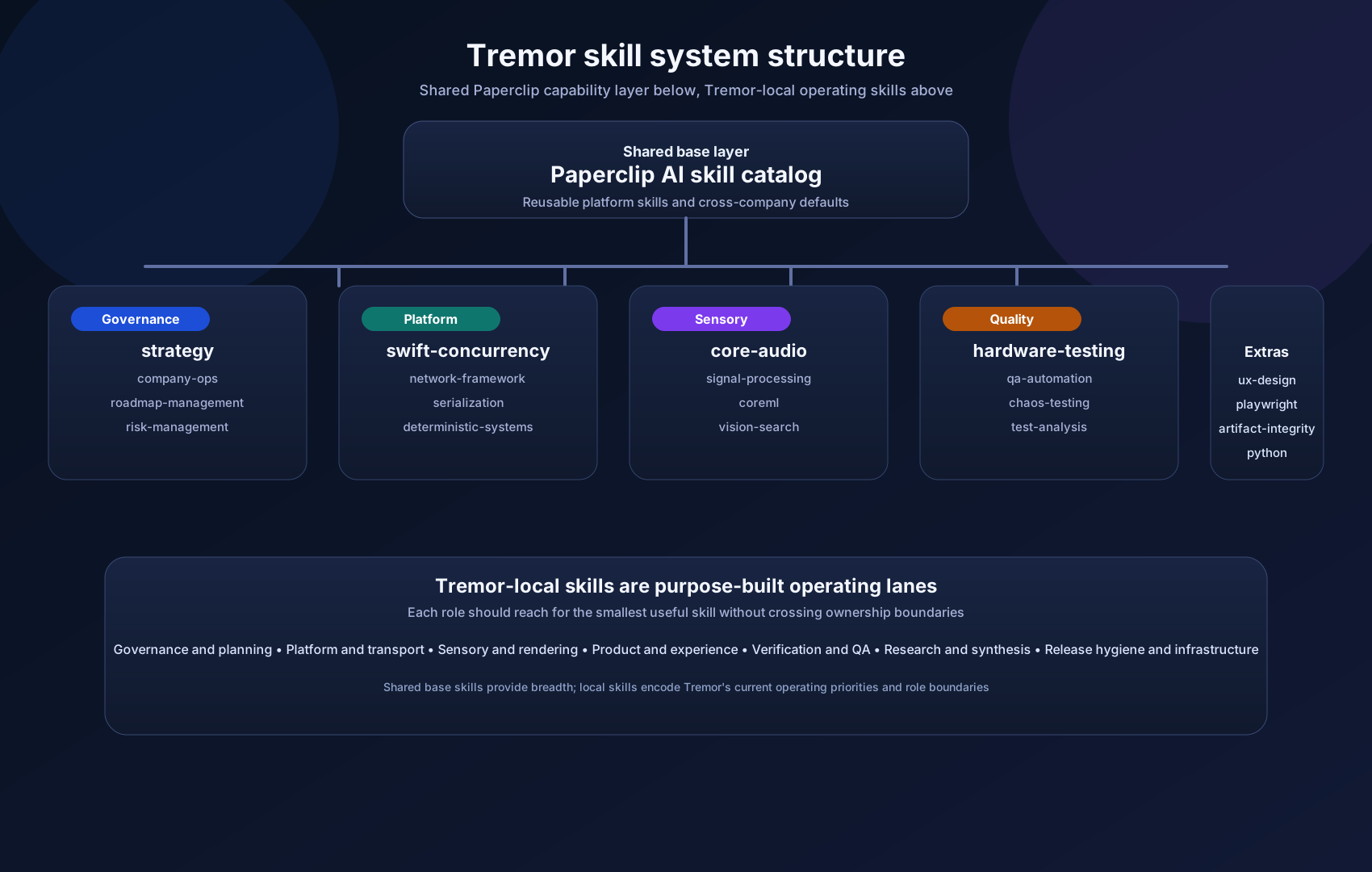 This diagram separates the shared Paperclip skill layer from the Tremor-local skill families. The local catalog is intentionally specific: governance, platform, sensory, product, verification, research, and release hygiene each live in their own lane.
Primary source anchors:
This diagram separates the shared Paperclip skill layer from the Tremor-local skill families. The local catalog is intentionally specific: governance, platform, sensory, product, verification, research, and release hygiene each live in their own lane.
Primary source anchors:
Docs-Site Information Architecture
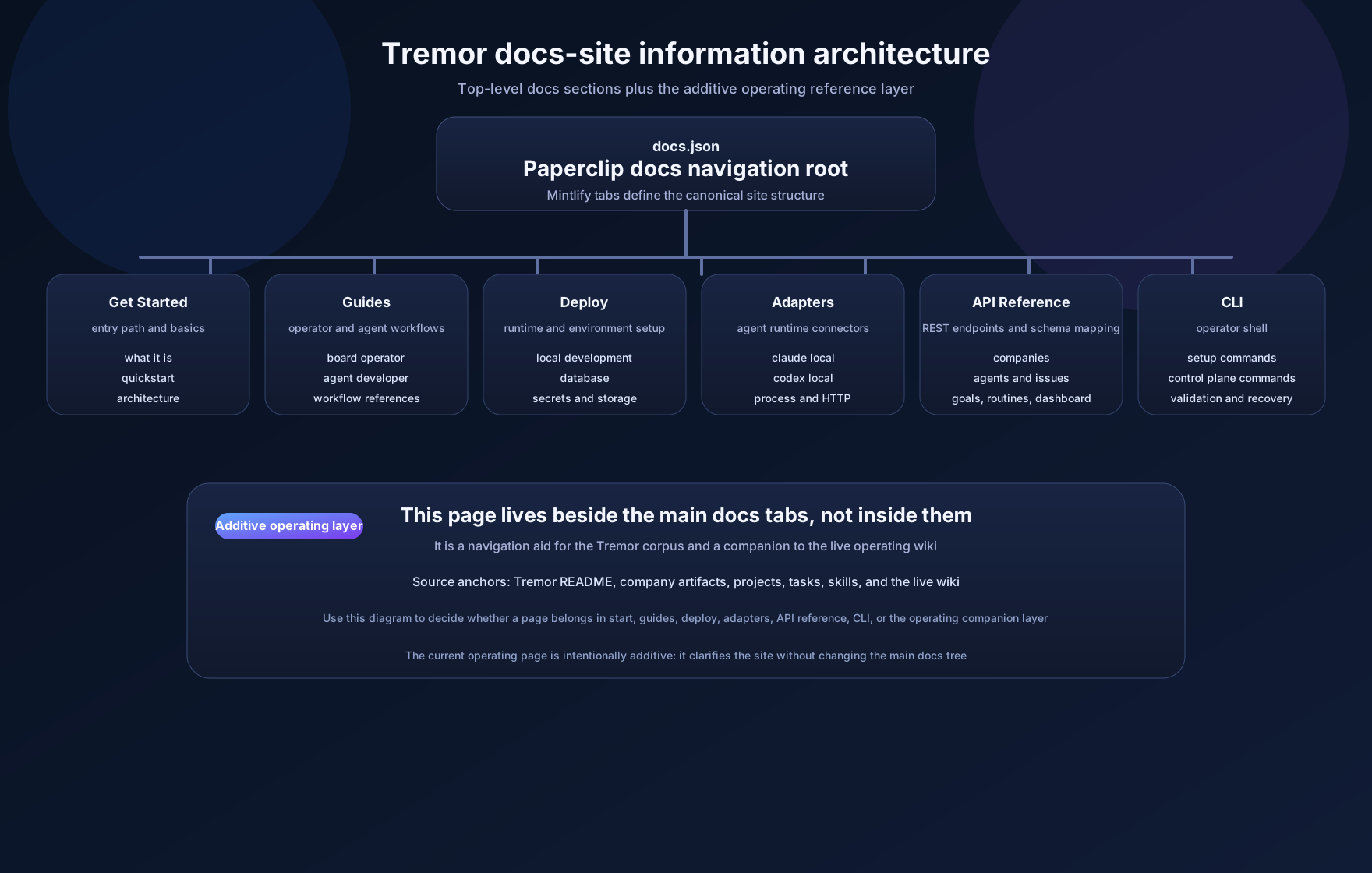 This is the navigation map for the docs site as a whole. It highlights the main top-level sections, then shows where this operating reference sits as an additive companion to the existing Tremor operating cabinet.
Primary source anchors:
This is the navigation map for the docs site as a whole. It highlights the main top-level sections, then shows where this operating reference sits as an additive companion to the existing Tremor operating cabinet.
Primary source anchors:
Use It As A Navigation Aid
When you land on a source page and need to branch outward, follow this order:- use the docs-site IA to choose the right section
- use the work hierarchy to identify the object you are touching
- use the team hierarchy to find the owner
- use the skill system to find the smallest useful capability
- use the topology diagram when you need a broader company view