

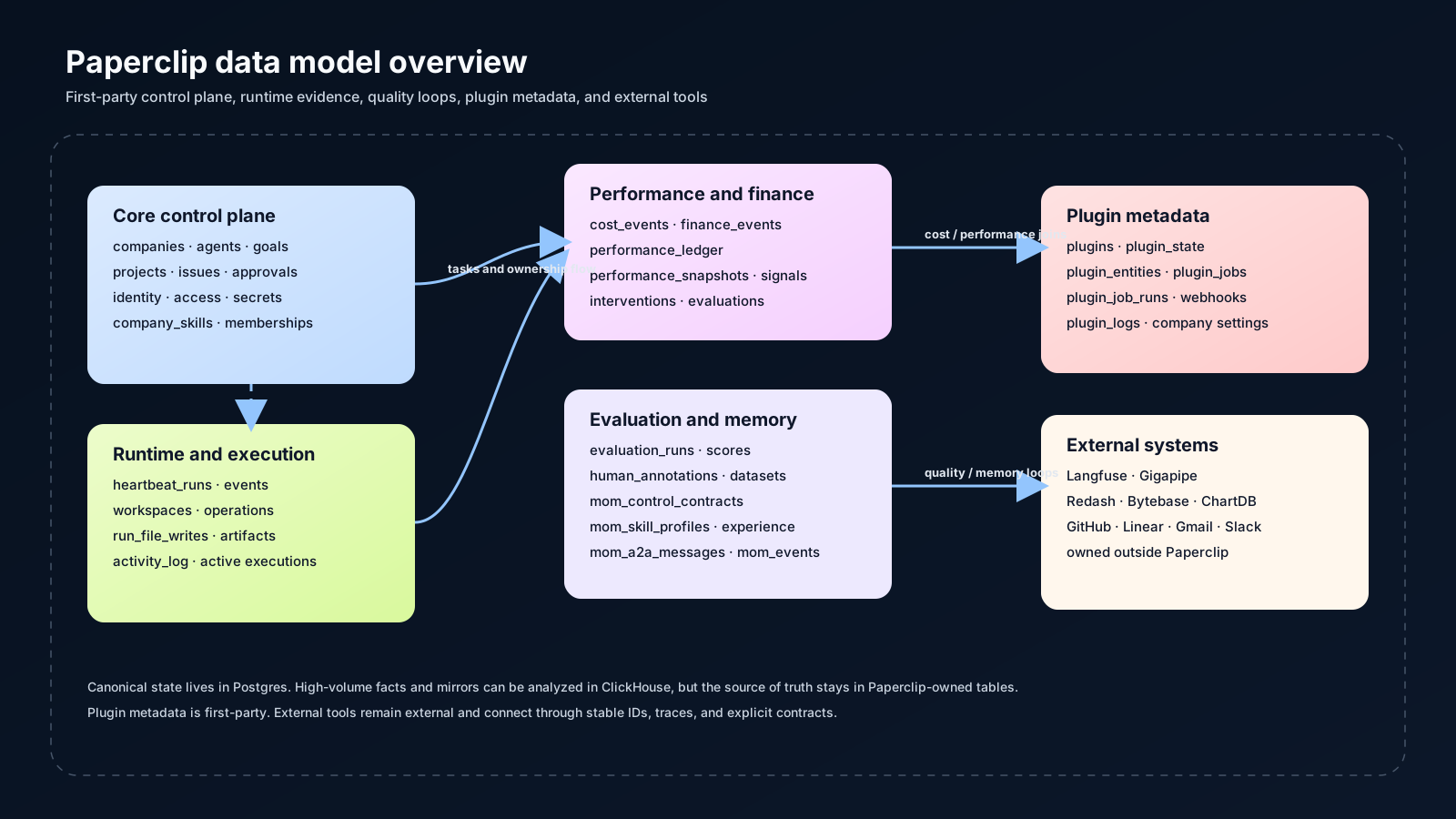
How To Read This Page
The model is organized from the board outward:- Identity and access establish who can act.
- Companies, agents, goals, projects, and issues define the work graph.
- Heartbeats and runtime tables record execution.
- Cost, finance, performance, evaluation, and memory tables record quality and improvement loops.
- Plugins and external tools extend the system without taking over ownership.
Ownership Boundaries
Paperclip is the source of truth for:- company structure
- agent registry and reporting lines
- work hierarchy and task ownership
- approvals and audit trail
- heartbeat execution history
- budgets, spend, and performance state
- plugin metadata and integration state
- evaluation, memory, and review records
- Langfuse owns its own product stores
- Gigapipe owns observability ingest and storage
- Redash owns dashboard metadata
- Bytebase owns change workflow metadata
- ChartDB owns diagram export state
- source tools like GitHub, Linear, Gmail, and Slack own their own records
- if Paperclip uses the row to govern work, it belongs here
- if Paperclip only reads, maps, or mirrors it, the source system still owns it
Major Entity Groups
Identity And Access
These tables define people, sessions, permissions, and join flows.usersessionaccountverificationboard_api_keyscli_auth_challengesinstance_user_rolescompany_membershipsinvitesjoin_requestsprincipal_permission_grants
Company And Org
These tables define the company shell and the agent workforce.companiescompany_logosagentsagent_api_keysagent_config_revisionsagent_runtime_stateagent_task_sessionsagent_wakeup_requestscompany_secretscompany_secret_versionscompany_skillsinstance_settings
Planning And Execution
These tables define goals, projects, issues, workspaces, work products, and the documents attached to them.goalsprojectsproject_goalsproject_workspacesexecution_workspacesworkspace_operationsworkspace_runtime_servicesissuesissue_commentsissue_labelslabelsissue_approvalsapprovalsapproval_commentsissue_attachmentsassetsissue_documentsdocumentsdocument_revisionsissue_work_productsissue_inbox_archivesissue_read_statesfeedback
Automation And Runtime
These tables describe how work is triggered, run, logged, and observed.routinesroutine_triggersroutine_runsheartbeat_runsheartbeat_run_eventsactivity_logrun_file_writesrun_output_artifactsissue_active_executions
run_file_writes and run_output_artifacts capture artifacts produced during a run. issue_active_executions tracks checkout and active execution state.
Finance And Performance
These tables answer the question: what did it cost, how did it perform, and what should change next?budget_policiesbudget_incidentscost_eventsfinance_eventsperformance_ledgerperformance_snapshotsperformance_signalsperformance_interventionsperformance_evaluations
performance_ledger is the compact run-level record used for quality and cost analysis. performance_snapshots, performance_signals, performance_interventions, and performance_evaluations form the improvement loop.
Evaluation And Review
These tables support scoring, review queues, annotated judgment, and dataset curation.evaluation_queue_assignmentsevaluation_rubricsevaluation_runsevaluation_scoreshuman_annotationsevaluation_datasetsevaluation_dataset_items
Memory And Coordination
These tables hold the higher-level control and learning layer used for director mode, agent handoff, and memory-rich workflows.mom_control_contractsmom_skill_profilesmom_experience_recordsmom_a2a_messagesmom_events
Plugins And Extensions
These tables describe first-party plugin metadata, not the external systems themselves.pluginsplugin_configplugin_company_settingsplugin_stateplugin_entitiesplugin_jobsplugin_job_runsplugin_webhook_deliveriesplugin_logs
ER-Style Overview
This diagram shows the main relationships that matter day to day.Where The Code Lives
The schema definitions live inpackages/db/src/schema/.
The main route and service surfaces follow the same groupings:
- identity and access
- company and org
- planning and execution
- runtime and automation
- finance and performance
- evaluation and review
- memory and coordination
- plugins and extensions
Practical Rules
- Treat Postgres tables as canonical first-party state.
- Treat ClickHouse tables as derived analytics or observability facts unless the schema says otherwise.
- Treat plugin metadata as Paperclip-owned integration state.
- Treat external tool records as external, even when Paperclip correlates them with company, issue, or run IDs.